Transfer Domain to Contabo Web Hosting
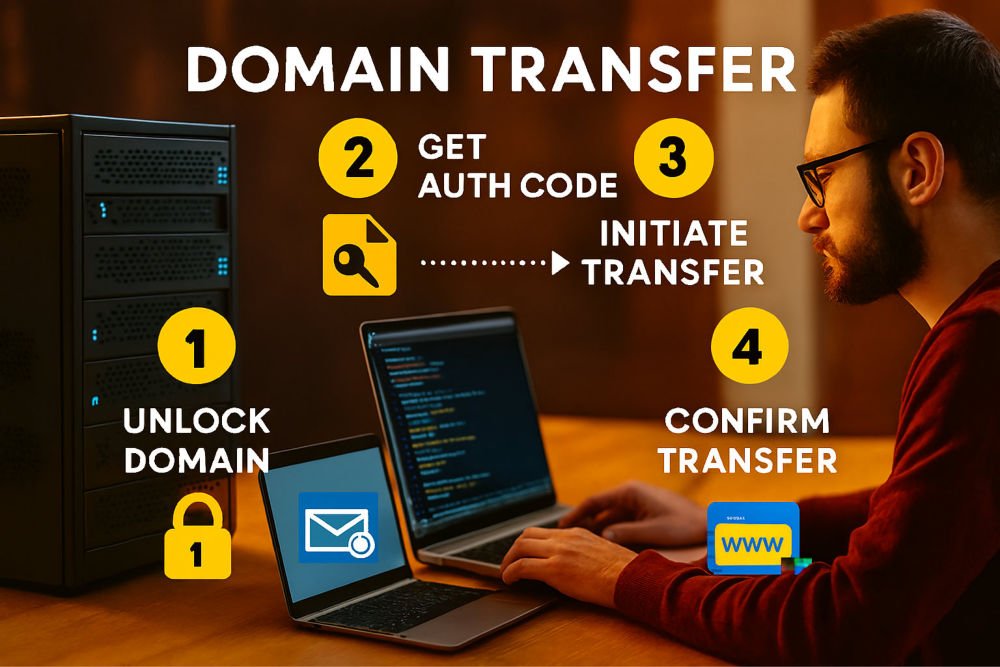
To transfer a domain in Contabo_Web_Hosting is much simpler than it sounds. Think of it like moving your house address from one street to another, you are just telling the internet where to find your website. Here’s how it works:
- Unlock your Domain: In your current web hosting control panel, you’ll need to unlock the domain. This is like opening the door so it can be moved from that Web Host to Contabo Web Hosting.
- Get the Transfer Code (Auth Code): Your web host provides a special password called an “Auth Code.” This proves you own that Domain which you want to transfer.
- Start Transfer at the New Provider: Now come to the Contabo Web Hosting, where you want to move your domain. Enter the Domain name and the Auth Code.
- Confirm via Email: You’ll usually get an email asking if you approve the transfer. Click Confirm.
- Wait a few days: The Domain transfer take 5–7 days. After that, your domain will now be hosted on Contabo Web Hosting.
This is basically a secure handover process. Unlock, code, confirm, and wait.
Transfer Domain - Introduction
Transferring a domain means moving the management of your website’s
address (like www.webhosting.com) from one registrar or hosting
provider to another hosting company like Contabo_Web_Hosting. If you currently have a domain
registered with a different web and want to manage it under Contabo Web
Hosting,
you’ll need to initiate a domain transfer. This process ensures that
Contabo becomes your new domain registrar, giving you control over DNS
settings, renewals, and web hosting integration. For beginners, the idea may
sound technical, but it’s essentially about authorization and
re‑registration and it is very simple to accomplish. You’ll request a code from your old
web hosting service provider, enter it
into Contabo Web Hosting system, and confirm ownership. The process is
standardized across all domain registrars, but each web hosting provider has its own interface. Contabo
Web Hosting simplifies this with its Customer Control Panel (CCP), where you can manage
domains, hosting, and servers in one place. Understanding the steps and
nuances will help you avoid downtime, email disruptions, or accidental
loss of ownership.
Why Transfer Domain to Contabo Web Hosting
Contabo Web Hosting is known for affordable web hosting solutions, reliable
and secure
infrastructure, as well as its user‑friendly management tools. By transferring your
domain, you consolidate your web hosting and
Domain_Registrar under one provider,
reducing complexity. This means you can manage DNS records, SSL Certificates, and
web hosting plans in a single dashboard. Contabo Web Hosting also
offers competitive pricing for domain renewals compared to many
registrars, which can save money in the long run. Another benefit is
technical support, having both your hosting and domain under Contabo,
ensures faster troubleshooting since you won’t need to coordinate
between two companies. For businesses, this integration reduces risk and
improves efficiency. Contabo Web Hosting has a global presence and robust infrastructure,
which
also mean better uptime and performance. Beginners benefit from
simplified processes, while advanced users appreciate the flexibility of
custom DNS configurations. Overall, transferring your domain to Contabo
is about convenience, cost savings, and streamlined management.
Preparing to Transfer Domain
Before you transfer domain, preparation is key. First, ensure your domain is
eligible for transfer. Domains cannot be transferred within 60 days of
registration or a previous transfer, as per ICANN rules. Next, unlock
your domain at your current domain registrar. Most providers lock domains by
default to prevent unauthorized transfers. You’ll also need to disable
privacy protection (WHOIS guard), since Contabo_Web_Hosting must verify ownership
details. The most critical step is requesting the Authorization
Code (Auth Code or EPP Code) from your current registrar. This
unique authorization code string proves that you own the domain and allows Contabo
web hosting to to initiate
the transfer. Additionally, back up your DNS records such as Email MX
records or subdomains, because these may not automatically carry over.
Planning ahead ensures minimal downtime. If your website or email is
tied to the domain, coordinate the transfer during low‑traffic hours to
reduce disruption.
Step‑by‑Step Process to Transfer Domain
- Request Auth Code: Contact your current registrar and obtain the authorization code.
- Log in to Contabo's CCP: Access the Contabo Web Hosting Customer Control Panel.
- Navigate to Domain Management: Select “Domains” >> “Domain Management.”
- Start Transfer: Click “Register or Transfer Domain.”
- Enter Domain Name: Type your full domain (e.g., www.webhostingship.com).
- Provide Auth Code: Enter the code you got from your old domain registrar to transfer domain to Contabo Web Hosting.
- Confirm Details: Review your ownership, your contact information, and renewal terms.
- Payment: You will have to pay the transfer and renewal fees anytime you transfer domain to another web hosting provider. Contabo has the lowest prices in the web hosting industry.
- Approval: Your old domain registrar will confirm the transfer request normally through an Email.
- Completion: Within a few days, the domain will appear in your Contabo Web Hosting account.
This process is straightforward but requires accuracy. Mistyping the
domain or Auth Code can delay the transfer. Once complete, you’ll manage
DNS and renewals entirely through Contabo.
DNS and Nameserver Updates When You Transfer Domain
After you transfer domain, you’ll need to update DNS settings. Contabo
Web Hosting
provides default nameservers, but you can configure custom ones if
needed. DNS records control how your domain connects to websites, email
servers, and other services. For example, the A record
points your domain to your hosting server’s IP address, while MX
records direct email traffic. Beginners should stick to
Contabo_Web_Hosting default settings unless they have specific requirements.
Updating nameservers may take up to 48 hours to propagate globally,
during which your site may experience brief downtime. To minimize
disruption, plan DNS changes carefully. Contabo’s CCP makes editing DNS
records intuitive, with clear fields for each type of record. Advanced
users can configure subdomains, TXT records for verification, and CNAME
records for redirects. Proper DNS management ensures smooth website
performance and secure email delivery.
Features of Transfer Domain Management in Contabo
When you transfer domain, Contabo web hosting management system offers several features:
- Centralized Dashboard: Manage domains, hosting, and servers in one place.
- DNS Control: Contabo provides you full access to DNS records for customization after transfer domain is completed.
- Affordable Renewals: The most Competitive pricing compared to many other registrars.
- SSL Integration: Easily add SSL certificates for secure websites.
- Email Setup: Configure MX records for professional email addresses.
- Global Infrastructure: Reliable uptime and performance.
- Support: Responsive customer service for transfer domain technical issues.
These features make Contabo Web Hosting highly appealing for both beginners and
professionals. The ability to manage everything in one panel reduces
complexity, while advanced options allow customization for unique needs.
Benefits of Transfer Domain to Contabo Web Hosting
Transfer Domain benefits in Contabo_Web_Hosting extend beyond convenience. By consolidating services,
you reduce the risk of miscommunication between providers. Contabo
pricing structure is transparent, avoiding hidden fees common with some
registrars. Their infrastructure ensures reliable uptime, which is
critical for your businesses. Security is another benefit, because Contabo supports
DNSSEC, protecting against domain hijacking. DNSSEC means Domain
Name System Security Extensions. DNSEC enhances the security of the
Domain Name System (DNS) by ensuring the authenticity and integrity of
DNS responses. It addresses vulnerabilities in the traditional DNS, such
as DNS spoofing and cache poisoning, which can redirect users to
malicious websites. DNSSEC achieves this by adding cryptographic
signatures to DNS records. These signatures allow DNS resolvers to
verify that the DNS data has not been tampered with and originates from
an authoritative source. This prevents attackers from injecting fake DNS
records during a man-in-the-middle attack. For beginners, the simplified
Contabo Web Hosting interface reduces the learning curve. For
professionals, advanced DNS and web hosting options provide flexibility.
Additionally, Contabo’s customer support is familiar with both hosting and domain
issues, making troubleshooting faster. Overall, transferring your domain
to Contabo enhances efficiency, security, and cost‑effectiveness.
Transfer Domain: Methods
There are two main methods to Transfer Domain from one hosting provider to another as given below:
- Standard Transfer Domain: Using the Auth Code, as we have discussed till this point.
- Internal Transfer Domain: If your domain is already registered with Contabo but under a different account, you can request an internal transfer.
The standard method is most common, involving authorization and
registrar approval. Internal transfers are simpler, requiring account
verification but no Auth Code. Beginners will almost always use the
standard method when moving from another host.
Common Challenges to Transfer Domain and Solutions
- Auth Code Issues: If your old registrar delays providing the code, contact their support.
- Locked Domain: Ensure the domain is unlocked before initiating transfer.
- Privacy Protection: Disable WHOIS privacy to allow verification.
- DNS Downtime: Back up records and plan changes during off‑peak hours.
- Payment Errors: Double‑check billing details in Contabo Web Hosting CCP.
By anticipating these challenges, you can avoid delays and downtime.
Transfer Domain: Conclusion
Transferring a domain to Contabo_Web_Hosting is a structured process involving
preparation, authorization, and DNS updates. For beginners, the key is
understanding each step and planning ahead. Contabo’s Customer Control
Panel or CCP simplifies management, while their infrastructure and support
ensure reliability. The benefits, cost savings, convenience, security,
and efficiency, makes Contabo Web Hosting a strong choice for hosting,
transfer domain and further
management. Whether you’re a first‑time website owner or an experienced
developer, transfer domain to Contabo provides long‑term
advantages.
Contabo Affordable Web Hosting Plans
We recommend you to explore the various Cloud Server VPS, Dedicated Server, and S3 Copatible Object Storage Configurations available at Contabo Web Hosting as below:
- Contabo Cloud VPS 60
- Contabo Cloud VPS 50
- Contabo Cloud VPS 40
- Contabo Cloud VPS 30
- Contabo Cloud VPS 20
-
Contabo Cloud VPS 10
Contabo Dedicated Server
7.
Contabo Dedicated Server Web Hosting
Contabo Object Storage
8.
Contabo Object Storage (S3-Compatible)